About
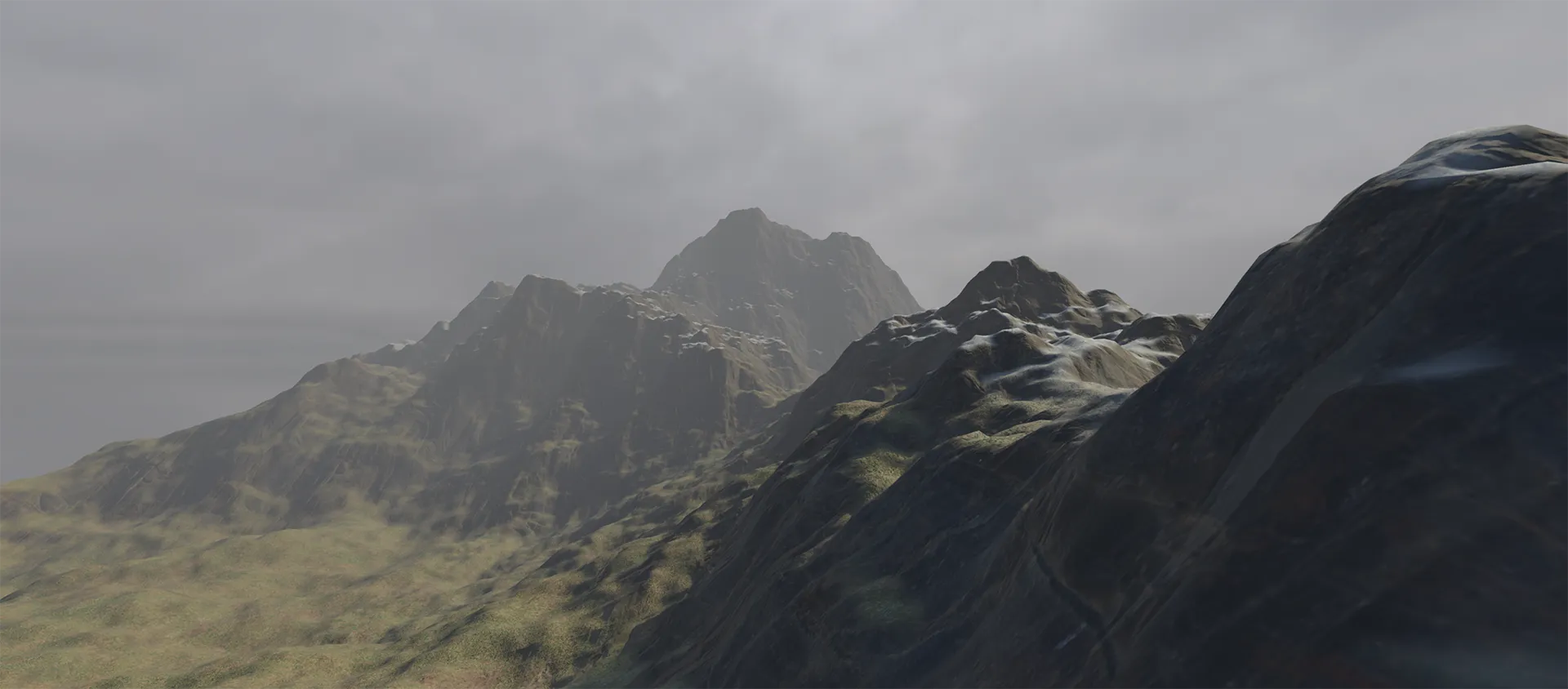
This project is a high-performance, procedural terrain generation system developed in Unity. It creates an infinite, seamless landscape using Perlin noise, featuring a chunk-based loading system and lod optimizations. The core focus was on leveraging modern Unity features like the Job System to ensure smooth performance even with complex mesh generation.
Showcase
Overview
Technical Highlights
- Multithreaded Generation: Utilizes the Unity Job System and
IJobForto offload heightmap calculation and mesh reconstruction from the main thread, maintaining high frame rates during terrain discovery. - Asynchronous Workflow: Built with a
Task-based asynchronous architecture (async/await) to coordinate chunk spawning and LOD updates without blocking the game loop. - Dynamic LOD System: Implements a distance-based Level of Detail strategy. Chunks further from the player are generated with lower vertex density, significantly reducing GPU overhead while maintaining visual fidelity near the camera.
- Terrain Shader: A custom terrain shader built with shader graph, assigning different PBR materials to the terrain depending on the terrain's height and slope.
- Infinite Scrolling: A manager tracks player movement and dynamically shifts, recycles, or regenerates terrain chunks, creating a seamless "infinite world" experience.
Heightmap Generation
The terrain profile is driven by a Perlin noise heightmap, generated via a custom multi-layered fractal noise (octaves) algorithm to produce a realistic, varied landscape surface.
Because evaluating layered noise algorithms across vast grids is computationally heavy, this generation logic served as the initial baseline for migration into the Unity Job System. Converting the heavy mathematical sampling loops into multithreaded jobs resolved the project's primary performance bottleneck, drastically reducing initial generation times and paving the way for smooth, real-time procedural updates.
public struct HeightMapJob : IJobFor
{
    [ReadOnly] public int Width;
    [ReadOnly] public int Height;
    [ReadOnly] public float Scale;
    [ReadOnly] public int Octaves;
    [ReadOnly] public float Persistence;
    [ReadOnly] public float Lacunarity;
    [ReadOnly] public float2 Offset;
    [ReadOnly] public NativeArray<float2> OctaveOffsets;

    [WriteOnly] public NativeArray<float> HeightMap;

    public void Execute(int index)
    {
        var x = index % Width;
        var y = index / Width;

        var halfWidth = Width / 2f;
        var halfHeight = Height / 2f;

        var amplitude = 1f;
        var frequency = 1f;
        var noiseHeight = 0f;

        for (var i = 0; i < Octaves; i++)
        {
            var sampleX = (x - halfWidth + OctaveOffsets[i].x + Offset.x) / Scale * frequency;
            var sampleY = (y - halfHeight + OctaveOffsets[i].y + Offset.y) / Scale * frequency;

            var perlinValue = noise.cnoise(new float2(sampleX, sampleY));
            noiseHeight += perlinValue * amplitude;

            amplitude *= Persistence;
            frequency *= Lacunarity;
        }

        HeightMap[index] = noiseHeight;
    }
}
Mesh Generation
Once the heightmap data is prepared, the MeshJob converts those 2D coordinates into a fully realized 3D mesh.
This mesh generation phase was also migrated to the Unity Job System to prevent massive main-thread frame drops. By processing vertex positioning, UV layout mapping, and index topology calculations concurrently across multiple CPU cores, the system transforms raw height array data into renderable buffers instantly. This ensures that the heavy architectural handoff from raw data to structural geometry remains entirely seamless.
[BurstCompile]
public struct MeshJob : IJobFor
{
    [ReadOnly] public int VerticesPerLineX;
    [ReadOnly] public int VerticesPerLineY;
    [ReadOnly] public int Width;
    [ReadOnly] public int Height;
    [ReadOnly] public float Step;
    [ReadOnly] public float TopLeftX;
    [ReadOnly] public float TopLeftZ;
    [ReadOnly] public float HeightMultiplier;
    [ReadOnly] public NativeArray<float> HeightCurve;
    [ReadOnly] public NativeArray<float> HeightMap;

    [WriteOnly] public NativeArray<float3> Vertices;
    [WriteOnly] public NativeArray<float2> Uvs;
    [WriteOnly] [NativeDisableParallelForRestriction] public NativeArray<int> Triangles;

    public void Execute(int index)
    {
        var x = index % VerticesPerLineX;
        var y = index / VerticesPerLineX;

        var sourceX = (int)math.min(x * Step, Width - 1);
        var sourceY = (int)math.min(y * Step, Height - 1);

        var heightSample = HeightMap[sourceX + sourceY * Width];

        var curveIndex = (int)math.clamp(heightSample * (HeightCurve.Length - 1), 0, HeightCurve.Length - 1);
        var curvedHeight = HeightCurve[curveIndex];

        Vertices[index] = new float3(
            TopLeftX + sourceX,
            (curvedHeight + heightSample) * HeightMultiplier,
            TopLeftZ - sourceY
        );

        Uvs[index] = new float2(
            sourceX / (float)(Width - 1),
            sourceY / (float)(Height - 1)
        );

        if (x < VerticesPerLineX - 1 && y < VerticesPerLineY - 1)
        {
            var quadIndex = x + y * (VerticesPerLineX - 1);
            var triangleIndex = quadIndex * 6;

            Triangles[triangleIndex] = index;
            Triangles[triangleIndex + 1] = index + VerticesPerLineX + 1;
            Triangles[triangleIndex + 2] = index + VerticesPerLineX;

            Triangles[triangleIndex + 3] = index + VerticesPerLineX + 1;
            Triangles[triangleIndex + 4] = index;
            Triangles[triangleIndex + 5] = index + 1;
        }
    }
}
Scheduling Jobs
Even with the Job System in place, generating a large number of terrain chunks still required a significant amount of CPU time, often taking longer than a frame to complete.
To address this, I wrapped the heightmap and mesh generation logic in a Task-based asynchronous workflow:
...
var job = new Job();
var handle = job.ScheduleParallel(length, 64, default);
while (!handle.IsCompleted)
{
    await Task.Yield();
}
handle.Complete();
...
This approach allowed the main thread to continue processing other tasks while the heavy generation work was offloaded to the background.
I originally went for Unity's Awaitable type, however, in the end I settled on Task, as I could use await Task.WhenAll(tasks); to wait for all asynchronous tasks to complete.
Terrain Shader
The terrain is rendered using a custom PBR shader built in Unity’s Shader Graph. It dynamically blends three distinct material layers (Grass, Snow, Rock) using a combination of world-height masking and slope-angle detection. To eliminate visible texturing seams and texture stretching on steep terrain surfaces, all texture sampling is calculated using a custom Triplanar Mapping sub-graph.
Triplanar Subgraph
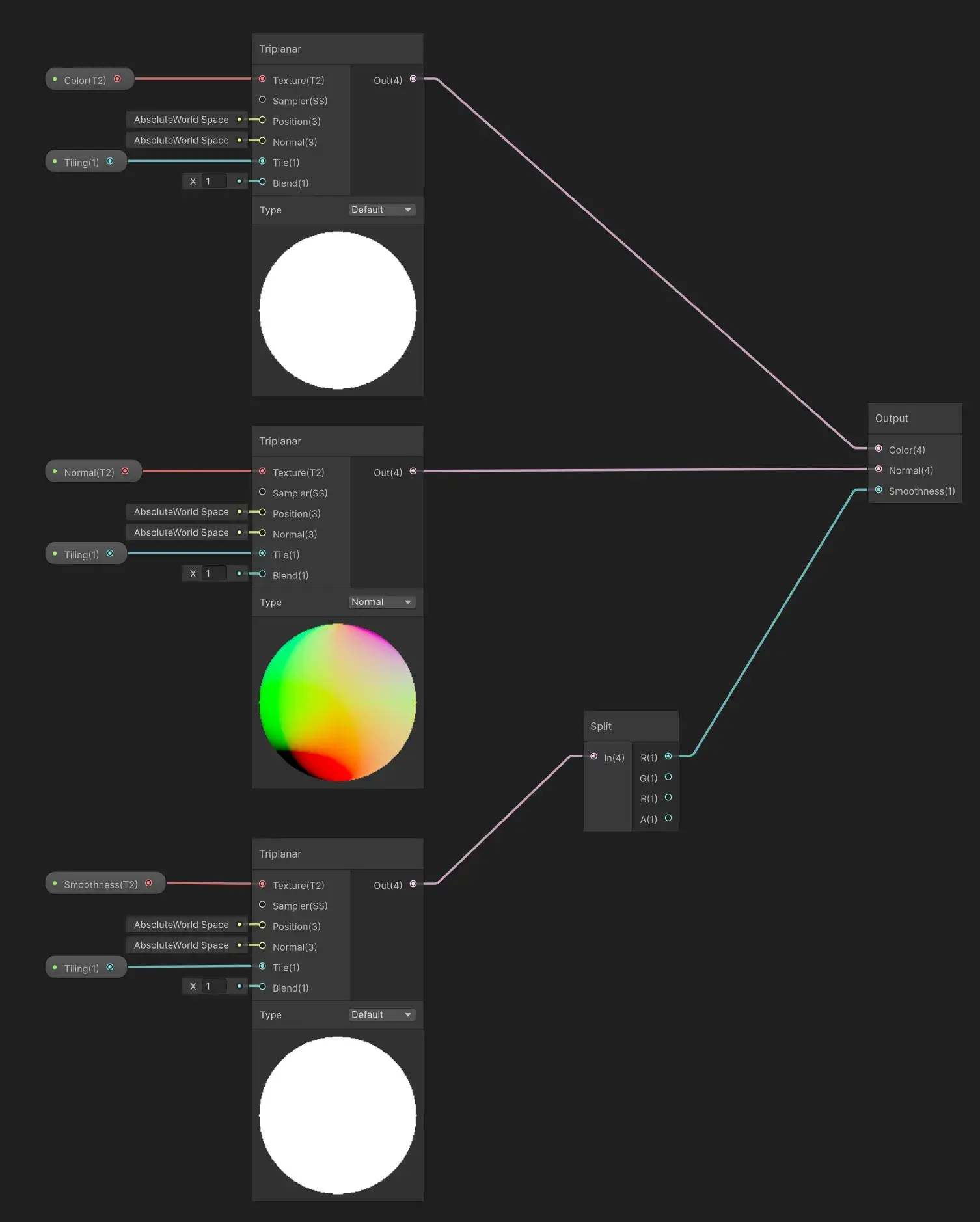 Instead of standard UV layout sampling, this reusable sub-graph uses three Triplanar nodes to sample the Color, Normal, and Smoothness maps in Absolute World Space.
The Normal map sampler is explicitly set to Type: Normal to handle normal vector unpacking across the three projection axes properly.
The Smoothness map is isolated from its texture's channels via a Split node to ensure a single-channel float feed to the master stack.
Instead of standard UV layout sampling, this reusable sub-graph uses three Triplanar nodes to sample the Color, Normal, and Smoothness maps in Absolute World Space.
The Normal map sampler is explicitly set to Type: Normal to handle normal vector unpacking across the three projection axes properly.
The Smoothness map is isolated from its texture's channels via a Split node to ensure a single-channel float feed to the master stack.
Height Mask Subgraph
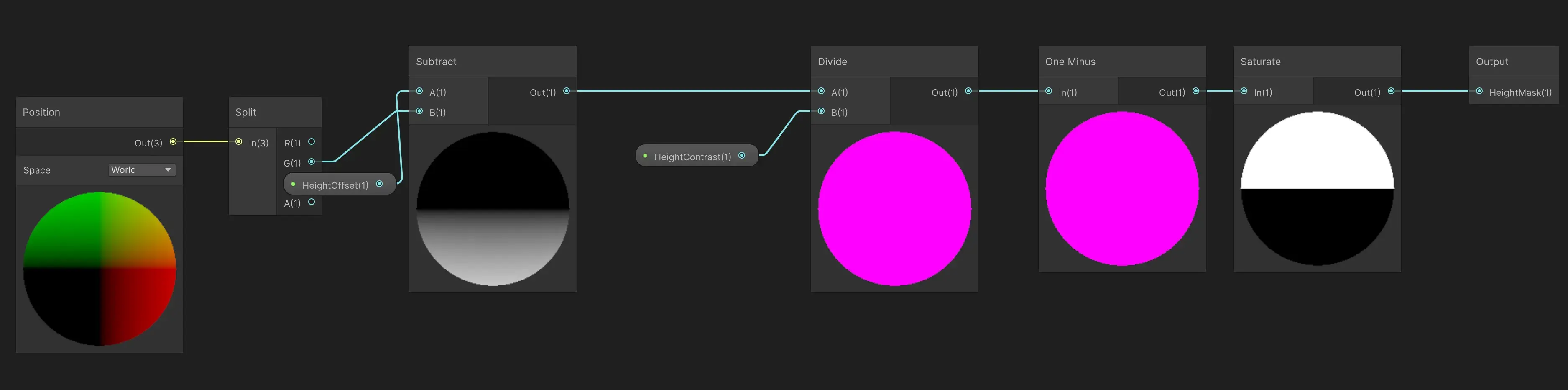 Responsible for separating the lower ground layer (grass) from the upper ground layer (snow).
It isolates the world position's Y-axis (the G channel from a Split node).
It subtracts a HeightOffset and divides by a HeightContrast parameter to create a sharp or smooth gradient transition.
A Saturate node clamps the output between
Responsible for separating the lower ground layer (grass) from the upper ground layer (snow).
It isolates the world position's Y-axis (the G channel from a Split node).
It subtracts a HeightOffset and divides by a HeightContrast parameter to create a sharp or smooth gradient transition.
A Saturate node clamps the output between 0.0 and 1.0 to ensure stable interpolation.
Slope Mask Subgraph
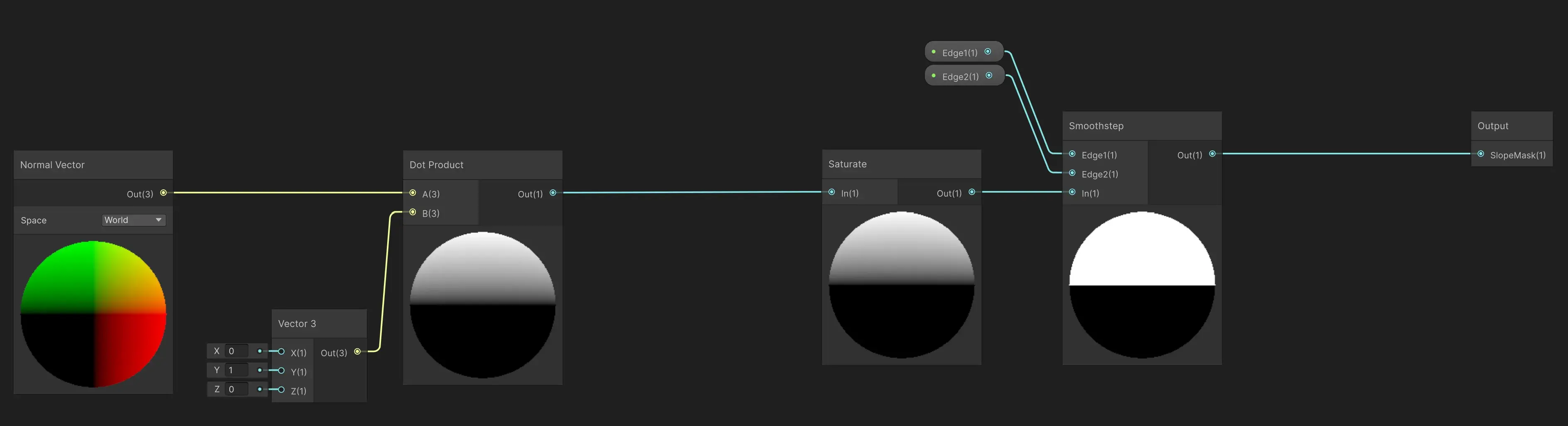
Determines where the vertical cliff material should overwrite the ground materials.
It calculates the Dot Product between the surface's World Normal Vector and an upward-facing vector (0, 1, 0).
This returns a gradient based on the surface angle (flat ground equals 1.0, vertical walls equal 0.0).
A Smoothstep node uses Edge1 and Edge2 parameters to control exactly how steep a slope must be before the rock texture completely takes over.
Final Master Graph
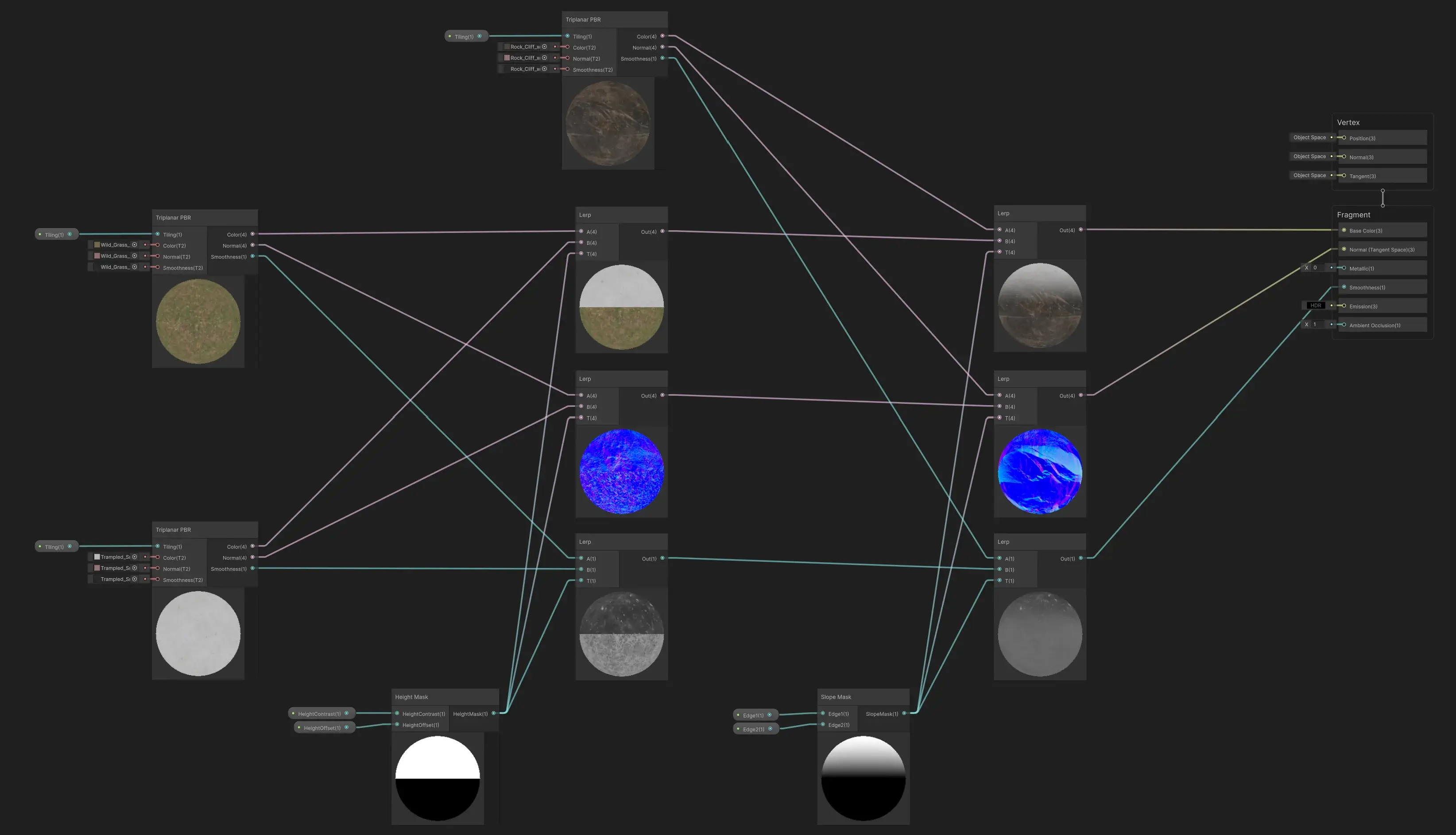 The final master graph chains the data together sequentially through a series of Lerp nodes:
- First Pass (Height Blend): The HeightMask interpolates between grass (Input A) and snow (Input B). This handles the horizontal variation of the terrain's appearance.
- Second Pass (Slope Blend): The SlopeMask acts as the final gate, interpolating the combined ground layers (Input A) with the rock cliff material (Input B).
- Output: The final cleanly blended Color, Normal, and Smoothness values are plugged directly into the Fragment master stack.
User Interface
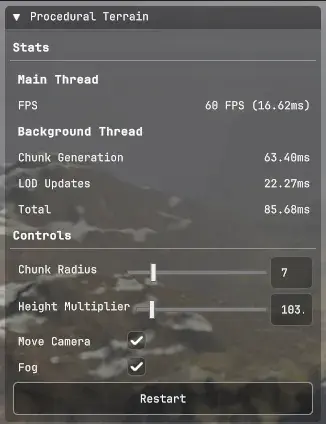 A simple user interface built with UI Toolkit, showing some stats and controls for the terrain generation.
Future Improvements
I'm generally happy with the results, as this project was mostly about learning how to use the Unity Job System, but there are a few areas I'd like to improve upon:
- GPU-accelerated grass and detail scattering using Compute Shaders.
- More realistic terrain features like mountains and valleys.